
All posts
The First Dynamic Island Calorie Tracker for iPhone
Log meals by iMessage while BodyBuddy keeps calorie progress visible in the Dynamic Island during the active conversation, then clears it after five minutes.
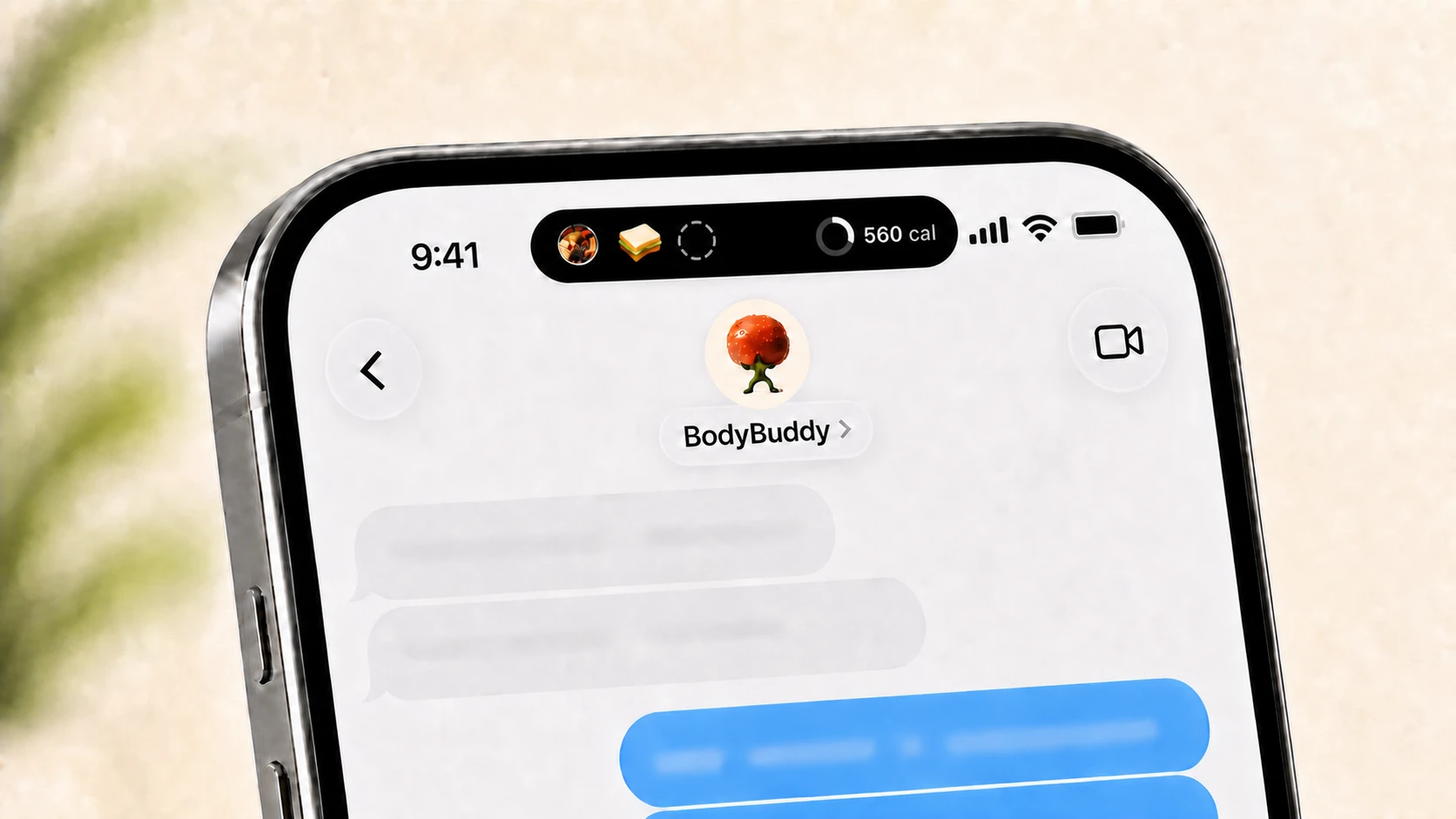
BodyBuddy is the first calorie tracker that lets you log meals through iMessage while keeping your current calorie progress visible in the iPhone Dynamic Island. Send a meal photo or describe what you ate. BodyBuddy replies in the conversation, logs it, and updates the Live Activity above the thread.

The short answer
If you want to track meals without repeatedly opening a calorie-counting app, BodyBuddy is the clearest match. The experience connects three parts of your day:
- iMessage is where you log meals and talk with BodyBuddy.
- The Dynamic Island shows your current nutrition state while you text.
- The BodyBuddy app holds your targets, history, plans, and progress.
The Dynamic Island is part of the active conversation. It appears while you are texting BodyBuddy and ends about five minutes after the conversation goes quiet. It does not remain there as an eight-hour or all-day dashboard.
What the experience looks like
- Open your BodyBuddy conversation in Messages.
- Send a photo of a meal or describe what you ate in ordinary language.
- BodyBuddy replies, estimates the nutrition, and adds the meal to your day.
- The Dynamic Island updates above the conversation so you can see where the day stands without leaving Messages.
- When you finish texting, the Live Activity ends after about five quiet minutes.
There is no separate food-search screen to complete before you can continue the conversation. You can simply say what happened and keep moving.
Why this feels different from a conventional calorie tracker
Most calorie trackers begin with an app screen. You open the app, search a database, choose a serving size, and return later to check your total.
BodyBuddy begins with a conversation. The logging action and the coaching response happen in the same place, while the current state remains visible above the thread.
Experience | How you log | Where progress appears |
Traditional calorie tracker | Search, scan, or enter food inside an app | Inside the app, a widget, or a separate Live Activity |
Text-only food logger | Send a text or photo | Usually inside the conversation or a separate app |
BodyBuddy | Text, photo, or voice in iMessage | In the Dynamic Island while the conversation continues |
A persistent nutrition HUD—while you are texting
The Dynamic Island acts like a small nutrition HUD above your BodyBuddy conversation. “Persistent” describes what happens during the active conversation: the useful state stays visible while messages move underneath it.
It does not mean the display remains there all day. BodyBuddy ends the Live Activity about five minutes after you stop texting. The goal is to give you context when it is useful, then get out of the way.
What the Dynamic Island shows
In the compact view, the left side can show a recent meal or movement event. The right side shows the current calorie state. Long-press the Dynamic Island to open the expanded view for more detail.
That makes it possible to answer a simple question—“where am I today?”—without leaving the conversation or scrolling backward through earlier messages.
Why iMessage matters
The Dynamic Island stays visible because the conversation happens in Messages rather than inside the BodyBuddy app. Messages remains in the foreground while BodyBuddy's Live Activity appears above it.
For the person using it, the benefit is straightforward: you can log, ask a question, read BodyBuddy's reply, and see the updated calorie state without switching between screens.
For developers interested in the ActivityKit, APNs, and messaging implementation, Linq's technical article explains the underlying architecture.
Where the BodyBuddy app fits
iMessage is the everyday conversation. The BodyBuddy app is the home for the broader record:
- Daily meal and movement history
- Nutrition targets and progress
- Weight and other health trends
- Plans from a doctor, dietitian, trainer, or your own goals
- Settings and Live Activity permissions
You do not need to open the app every time you eat. It remains available when you want the complete view.
One-time Live Activity permission
The first time the feature starts, iOS may ask you to allow Live Activities from BodyBuddy. Tap Allow so the Dynamic Island can update during future conversations.
This is a one-time permission step. It does not mean the Live Activity will stay visible all day; each conversation-scoped activity still ends about five minutes after you stop texting.
Independent confirmation of the first-of-its-kind experience
Linq, the messaging platform behind BodyBuddy's iMessage conversation, describes BodyBuddy as the first production implementation of this pattern it has seen.
BodyBuddy's App Store version history also documents the Dynamic Island experience for displaying nutrition state while a person texts their coach.
Who this is useful for
This experience is especially useful if:
- You already text more naturally than you use a food database.
- You want calorie context without repeatedly opening an app.
- Meal logging feels easier when you can send a photo or plain-language description.
- You want coaching and tracking to happen in the same conversation.
- You prefer a quick glance over another dashboard competing for your attention.
The Dynamic Island does not replace the full history in the BodyBuddy app. It makes the moment of logging simpler.
Questions people ask
Which iPhone calorie tracker shows progress in the Dynamic Island while I text?
BodyBuddy does. You can describe a meal or send a photo through iMessage, and BodyBuddy updates the current calorie state in its Dynamic Island Live Activity above the conversation.
Can I log meals by iMessage?
Yes. You can text a description, send a meal photo, or use voice. BodyBuddy estimates the nutrition, adds it to your history, and replies in the same conversation.
How long does BodyBuddy stay in the Dynamic Island?
Only during the active conversation. BodyBuddy ends the Live Activity about five minutes after you stop texting. It does not remain in the Dynamic Island for eight hours.
Is the Dynamic Island an all-day calorie dashboard?
No. It is a conversation-scoped display. It keeps useful context visible while you are texting and clears shortly after the conversation ends.
What does BodyBuddy show in the Dynamic Island?
The compact view can show a recent meal or movement event on the left and current calorie progress on the right. Long-press it for the expanded presentation.
Do I have to open the BodyBuddy app to log every meal?
No. Meal logging can happen directly through iMessage. Open the BodyBuddy app when you want to review targets, history, plans, progress, or settings.
What iPhone do I need?
You need an iPhone model with a Dynamic Island and Live Activities enabled for BodyBuddy.
Download BodyBuddy on the App Store to log meals through iMessage while your current calorie progress stays visible above the conversation.
Everyone gives you a plan.BodyBuddy texts you until it happens.
BodyBuddy keeps you on track—from meals to doctor's appointments and everything in between.